


Skip links

AND-X01: Android™ Application Development

Because we know just how hard it is to get the size.

Training
Certificate

AND-X01: Android™ Application Development

Course Information

Course Name

AND-X01: Android™ Application Development

Exam code

AND-X01

Duration

5 Days

Overview

This certification is critical for your Android development career. It will improve your potential in the ever-growing Android market and move your development career forward.
To become an Android Certified Application Developer, you have to pass exam AND-X01 which tests your knowledge and experience on topics covered in the course titled “Android Application Development”.

Android application development certificate

Upon completing this exam with a passing grade (70%), you will receive an email in no later than 10 working days from the exam date having a username and password to access the Android ATC student’s dashboard. Upon receiving your login information by email, you will be able to download your certificate in PDF format, access your score report, and if you wish you may order your hard copy certificate and ID card.
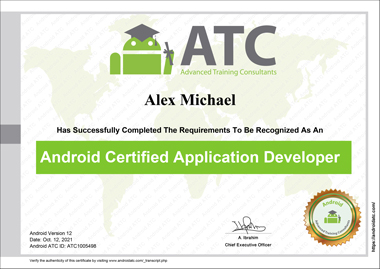
Android certified application developer version 12

Exam questions cover theoretical and practical aspects of each course. Some questions might include code snippets to test the technical and programming skills.

Why Android Certifications?

In the last few years, smartphones have become the go-to platform for developing all sorts of applications. Business applications for banks, TVs, universities have been migrating from websites to mobile applications. Furthermore, Android devices are dominating the market share of mobile phones. All this has made Android application development among the most required skills in the IT sector and in the available IT jobs.

Overview

Overview

This certification is critical for your Android development career. It will improve your potential in the ever-growing Android market and move your development career forward.
To become an Android Certified Application Developer, you have to pass exam AND-X01 which tests your knowledge and experience on topics covered in the course titled “Android Application Development”.

Android application development certificate

Upon completing this exam with a passing grade (70%), you will receive an email in no later than 10 working days from the exam date having a username and password to access the Android ATC student’s dashboard. Upon receiving your login information by email, you will be able to download your certificate in PDF format, access your score report, and if you wish you may order your hard copy certificate and ID card.

Android certified application developer version 12

Exam questions cover theoretical and practical aspects of each course. Some questions might include code snippets to test the technical and programming skills.

Why Android Certifications?

In the last few years, smartphones have become the go-to platform for developing all sorts of applications. Business applications for banks, TVs, universities have been migrating from websites to mobile applications. Furthermore, Android devices are dominating the market share of mobile phones. All this has made Android application development among the most required skills in the IT sector and in the available IT jobs.


Prerequisites

This course consists of 12 lessons; the first 3 focus on Kotlin fundamentals for candidates who do not have enough programming background; therefore, no prerequisites for this course.

Upon completing this course, students will be able to:

  1. Understand the essentials of the Kotlin Programming Language and all Kotlin topics related to Android applications development.
  2. Design and build a complete Android application.
  3. Debug and maintain Android applications using different tools and plugins.
  4. Thoroughly understand the life-cycle of an Android application and its main components.
  5. Use external resources, manifest files, intents and adapters.
  6. Understand and use the Google cloud authentication and database for Android apps.
  7. Build location-aware applications using GPS as a location provider and Google Maps.
  8. Test and publish your Android apps.


Course Outline

  • Kotlin History
  • Kotlin Advantages
  • How Kotlin Programs Work?
  • Kotlin Software Prerequisites
  • IntelliJ IDEA
  • Installing IntelliJ IDE
  • Creating a Kotlin Program
  • Running a Kotlin Program
  • The main( ) function
  • Writing Comments
  • Kotlin Variables
  • Kotlin Data Types
    • Input of Information to Kotlin Program
  • Introduction
  • If Statement
  • If – Else Statement
  • If Else and Logical Operators
  • When Statement and Expression
  • For Loops
  • While Loops
  • Do-while Loops
  • Jump Expressions
  • Break Statement
  • Continue Statement
  • Return Statement
  • Functions
  • Function Structure
  • Creating a Function
  • Functions and Variable Scope

Object-Oriented Programming (OOP)

Object 

Class

  • Creating a Class
  • Providing Constructors for Your Classes
  • Class Inheritance
  • Abstract Class
  • Interface Class
  • Generic Class
  • Class Variables
  • Member Variables

Kotlin Collections

  • Hashmaps
  • ArrayList
  • listof and mutableListOf

Introduction

 Platform Architecture

Libraries

Components of Android Application

Types of Android processes and their priorities

Android Studio

  • What is Android Studio?
  • Android Studio Software Prerequisite
  • Install Android Studio

Creating Kotlin Project Using Android Studio

Run Android App

  • Instant Run

Setup an Android Virtual Device

What is Android Studio Gradle?

Run your Apps on a Hardware Device (Physical Phone)

  • Run your Android App on Android Phone

Lab 4: Creating Your First Application

  • Create your first Android application
  • Build a “Simple Calculator” Application

Introduction

Android Project Structure

View

  • Adding a View to your application
  • Adding a View in an XML layout file
  • Adding a View using Kotlin code
  • Configuring Layout Views

Creating a User Interface

  • Adding a Text Box
  • Adding an Image
  • Adding a Check Box
  • Adding a Radio Button

Lab 5: Creating a Pizza Order Application

  • Create Your Application User Interface
  • Configure the Android Application Code
  • Run Your Application

Introduction

Views

Layouts

  • Constraint Layout
  • Linear Layout
  • Relative Layout
  • TableRow Layout
  • Frame Layout

Android Styles and Themes

App Manifest

App Icons

Lab 6: Android Application Layouts, Styles, and Themes

  • Create Your Application Layout
  • Configure Your Styles and Themes
  • Configure Your App Icon

Snackbar Class

What is an Activity?

Activity Lifecycle

  • Managing the activity lifecycle

Android Intent

  • Navigating Between Activities
  • Passing Data between Activities

Android Alert Dialog

Android Notifications

  • Creating an Android Notification
  • Notification Channel

Lab 7: Creating a Mail Schedule Pickup App

Progress Bar

Seek Bar

Date and Time Picker Dialogs

  • Creating a Date Picker
  • Creating a Ttime Picker

Calendar View

Web View

Rating Bar

Video View

Texture View

Lab 8: Creating a Pizza Schedule a App

  • Configuring the Pizza Size using SeekBar widget
  • Configuring the order Pickup date using the Date Picker Class
  • Configuring the order Pickup time using the Time Picker Class Pass the app order details to another activity using the Intent class
  • Using the Rating Bar widget to leave the app user review
  • Menus
  • Bottom AppBar
  • Recycler View
  • SearchView
  • TabLayout and ViewPager
  • Spinner
  • Drawer

Lab 09: Creating Navigation Drawer in Android App 

Introduction

What is the JSON?

How does Firebase Database work?

Firebase Authentication (Signup and Login Android App)

Configure your App to use Firebase Services

Configuring Firebase Authentication

  • Login to App Using a Firebase User Accounts
  • Logout Configuration

Using Firebase Assistant with Android Studio

Firebase Database

Real Time Database

Cloud Firestore Database

Lab 10: Firebase Authentication and Database

  • Configure your App to use Firebase Services
  • Adding Firebase to your Android App
  • Configuring User Authentication Using Firebase Authentication
  • Creating a Firebase Cloud Database
  • Retrieving Data | Firebase Cloud Database

Introduction

What is GPS and how does it work?

  • Latitude and Longitude
  • Camera Position

Adding Google Maps to an Android app

  • Map Fragment
  • Getting a Google API key
  • Adding a Google Map Marker
  • Capture a User’s Location on Google Maps
  • Reverse Geolocation on Google Map
  • Retrieving a Readable Address on Google Map

Lab11: Location-Aware Apps Using a GPS and Google Maps

  • Creating an App Interface and Configuring Google Services Prerequisites
  • Creating a Google Map Fragment
  • Getting a Google API key
  • Configuring Your App to Use Your Google API Key and User App’s Permission
  • Adding Google Map and Capturing Users’ Location

Testing and Feedback Your App

  • Setting up a Test Environment
  • Usability Testing by Participants
  • Starting Your Test Session
  • Analyzing Your Test
  • Firebase Test Lab

Publishing Android App on Google Play Store

  • Preparing your app for release
  • Publish App on Google Play Store
Course Price

RM5,500.00 exc. 8% tax

Training Dates

Fee RM875.93

Product price:RM5,500.00 exc. 8% tax
Total options:
Order total:
Fill up the form for enquiry
